Compare / Rendair AI
RenderAI vs Rendair AI: which is better for architects and designers?
If you are looking for a Rendair alternative, this page compares RenderAI and Rendair AI in one place: workflow, free plans, commercial use, video, teams and pricing, with dated sources. Both run in the browser; they take different routes to the same render.
At a glance
Short answer
Choose Render AI if
You want one simple screen: upload a sketch, photo or 3D view, pick a Style, add a few words and get a render, then upscale it or turn it into a video of up to 30 seconds. Plans start at $13 a month, and free renders already come with commercial use.
Choose Rendair AI if
You want many specialized apps (virtual staging, change material or season, floor plan to 3D), chat editing and a choice of AI models, and your team needs shared credits, roles and 1:1 training.
The biggest practical differences:
- Free plan: Rendair's free plan gives 20 credits once, for personal use and evaluation only; commercial use starts on Starter. RenderAI's free tokens produce renders you can use commercially.
- Workflow: RenderAI keeps rendering on one Create screen with Styles and a short instruction. Rendair gives each task its own app and lets you pick the model for each run.
The facts, compared (as of October 2026)
Taken from each product's public pages. Numbers in brackets point to the sources under the table.
| Dimension | RenderAI | Rendair AI |
|---|---|---|
| Free plan | Free tokens for renders, with commercial use and no imposed watermark. | 20 credits once, 3 projects, 1 board. Personal use only; no watermark. [2] [3] |
| Paid plans | Starter $13/mo, Creator Pro $39/mo, Premium Pro $199/mo; yearly options. | Starter $19/mo, Pro $49/mo, Studio Pro $199/mo; yearly = 10 × monthly. [1] |
| Video | Animate: 5 to 30 seconds, up to 1080p, on Creator Pro and Premium Pro. | Image to Video (Kling V3): 5 or 10 seconds at 720p, 1080p or 4K; 38 to 190 credits per clip. [4] [5] |
| Inputs | Any image: sketches, photos (HEIC from a phone too), renders, and views exported from any 3D software. JPG, PNG, WebP, HEIC up to 5 MB. | Images (JPG, PNG, WebP), videos, and 3D files in GLB, GLTF, OBJ or STL. [6] |
| Workflow | One Create screen: upload, pick a Style, add a short instruction; Upscale and Animate in the same place. | 27 task apps (create, edit, upscale, video, 3D), chat editing and a choice of AI models. [7] |
| Inside modeling software | Rhino plugin (beta), more coming. | Browser only. [8] |
Paid plans
RenderAI
Starter $13/mo, Creator Pro $39/mo, Premium Pro $199/mo; yearly options.
Rendair AI
Starter $19/mo, Pro $49/mo, Studio Pro $199/mo; yearly = 10 × monthly. [1]
Video
Inputs
RenderAI
Any image: sketches, photos (HEIC from a phone too), renders, and views exported from any 3D software. JPG, PNG, WebP, HEIC up to 5 MB.
Rendair AI
Images (JPG, PNG, WebP), videos, and 3D files in GLB, GLTF, OBJ or STL. [6]
Workflow
RenderAI
One Create screen: upload, pick a Style, add a short instruction; Upscale and Animate in the same place.
Rendair AI
27 task apps (create, edit, upscale, video, 3D), chat editing and a choice of AI models. [7]
Inside modeling software
RenderAI
Rhino plugin (beta), more coming.
Rendair AI
Browser only. [8]
Sources
- Rendair AI pricing (rendair.ai/pricing) , accessed October 30, 2026
- Rendair help: Can I use Rendair for free? , accessed October 30, 2026
- Rendair help: Can I use the images commercially? , accessed October 30, 2026
- Rendair help: Can I generate videos? , accessed October 30, 2026
- Rendair help: Credit costs for each tool , accessed October 30, 2026
- Rendair help: Which file formats can I upload? , accessed October 30, 2026
- Rendair AI tools (rendair.ai/tools) , accessed October 30, 2026
- Rendair help: Is there a plugin for SketchUp, Revit or Rhino? , accessed October 30, 2026
RenderAI figures come from our pricing page (list prices in USD).
RenderAI vs Rendair AI at a glance
Key differences across workflow, inputs, free plans, video, teams and pricing.
| Dimension | RenderAI | Rendair AI |
|---|---|---|
| Primary focus | Fast, browser-based AI rendering for architects and interior designers: one screen to render, upscale and animate. | Browser workspace for architects with 27 apps to create, edit, upscale, animate and make 3D, plus chat editing and shared boards. |
| Starting point | Any image: a hand sketch, a site photo, a render, or a view exported from SketchUp, Revit, Rhino or Archicad. HEIC photos from a phone work too. | Images, videos, and 3D files in GLB, GLTF, OBJ or STL; other software goes in as an exported image. |
| How you work | Pick a Style (exteriors, interiors, floor plans, night, seasons, watercolor…) and add a short instruction in plain words. AI Vision reads your image and writes the detailed prompt for you. | Pick an app for each task (sketch, elevation or floor plan to render; change material, season, time of day or weather; virtual staging; populate a scene) or edit by chat, and choose the AI model. |
| Free plan | Free tokens for renders, with commercial use and no imposed watermark. | 20 credits once, 3 projects and 1 board, for personal use only. |
| Video | Animate turns a sketch, image or render into a 5 to 30 second clip, up to 1080p, on Creator Pro and Premium Pro. | Kling V3 clips of 5 or 10 seconds at 720p, 1080p or 4K, with start and end frames. |
| Teams and presenting | Boards: an infinite canvas to arrange renders and present options. Priced per account, for individuals and small teams. | Shared boards with view-only client links. Pro includes 2 members and Studio Pro 5, with a shared credit balance and roles. |
| Devices | Browser on desktop, tablet and phone; nothing to install. | Browser on desktop, tablet and phone; nothing to install. |
| Pricing model | Plans with a monthly token allowance, from $13 a month for one person; yearly options. | Credits from $19 a month (Starter, 500 credits); yearly billing at 10 × monthly; top-up packs on paid plans. The cost of each run depends on the model. |
Primary focus
RenderAI
Fast, browser-based AI rendering for architects and interior designers: one screen to render, upscale and animate.
Rendair AI
Browser workspace for architects with 27 apps to create, edit, upscale, animate and make 3D, plus chat editing and shared boards.
Starting point
RenderAI
Any image: a hand sketch, a site photo, a render, or a view exported from SketchUp, Revit, Rhino or Archicad. HEIC photos from a phone work too.
Rendair AI
Images, videos, and 3D files in GLB, GLTF, OBJ or STL; other software goes in as an exported image.
How you work
RenderAI
Pick a Style (exteriors, interiors, floor plans, night, seasons, watercolor…) and add a short instruction in plain words. AI Vision reads your image and writes the detailed prompt for you.
Rendair AI
Pick an app for each task (sketch, elevation or floor plan to render; change material, season, time of day or weather; virtual staging; populate a scene) or edit by chat, and choose the AI model.
Free plan
RenderAI
Free tokens for renders, with commercial use and no imposed watermark.
Rendair AI
20 credits once, 3 projects and 1 board, for personal use only.
Video
RenderAI
Animate turns a sketch, image or render into a 5 to 30 second clip, up to 1080p, on Creator Pro and Premium Pro.
Rendair AI
Kling V3 clips of 5 or 10 seconds at 720p, 1080p or 4K, with start and end frames.
Teams and presenting
RenderAI
Boards: an infinite canvas to arrange renders and present options. Priced per account, for individuals and small teams.
Rendair AI
Shared boards with view-only client links. Pro includes 2 members and Studio Pro 5, with a shared credit balance and roles.
Devices
RenderAI
Browser on desktop, tablet and phone; nothing to install.
Rendair AI
Browser on desktop, tablet and phone; nothing to install.
Pricing model
RenderAI
Plans with a monthly token allowance, from $13 a month for one person; yearly options.
Rendair AI
Credits from $19 a month (Starter, 500 credits); yearly billing at 10 × monthly; top-up packs on paid plans. The cost of each run depends on the model.
What is RenderAI?
RenderAI is a browser-based AI visualization platform that lets architects, interior designers, product designers, engineers, and real-estate teams turn sketches, drawings, 3D views, or photos into photorealistic renders in seconds, plus short videos on Creator Pro and Premium Pro. Users work directly in the browser (on desktop, tablet, or phone) with no render engine to configure, or from inside Rhino with our plugin.
The product is deliberately designed so you don’t need to manage AI models or engineer prompts: you upload material, choose a few clear settings, and RenderAI handles the complexity under the hood while keeping outputs aligned with your design intent. All plans include rights for personal and commercial use of generated images and videos, and renders are delivered without imposed watermarks, making it easy to trial RenderAI on real client work and marketing materials from the first day.
Explore role-specific workflows for architects and interior designers, organize ideas on Project Boards, or start from the RenderAI.app homepage.

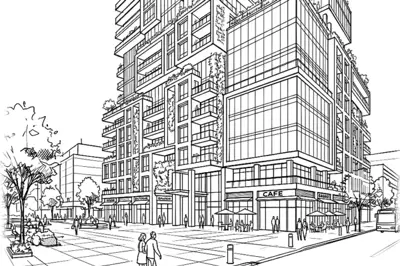
One sketch, one tower, full street life. By Robert P, Architect

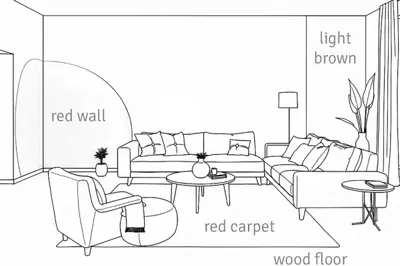
Written notes on a line drawing, turned into the room. By Lock B, Interior Designer
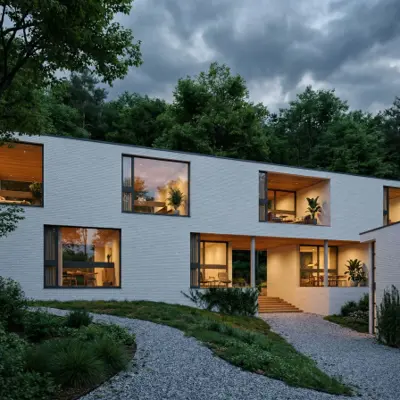
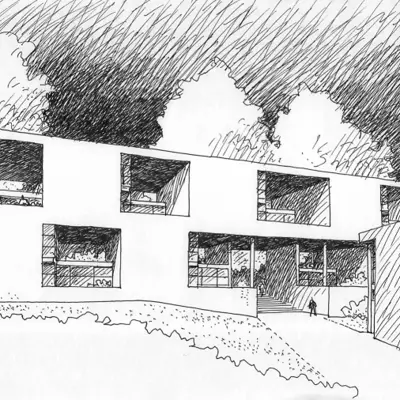
Pen on paper in the morning, sunset render by lunch. By Gaaf Design, Architect

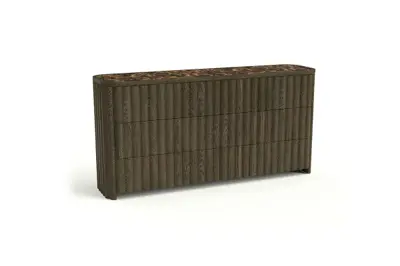
From white background to lived-in setting. By Arcelde, Furniture Designer


Same model, real materials and light. By Ahudemi, Interior Designer

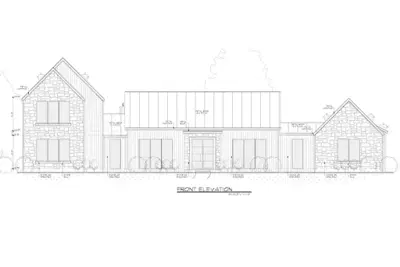
From a Revit facade to a photoreal stone house. By Airik Construction
What is Rendair AI?
Rendair AI is a browser-based AI rendering workspace for architects and interior designers. It groups 27 apps by task: create (sketch, elevation, floor plan or 3D model to render), edit (change material, season, time of day or weather, virtual staging, populate a scene, fix people) and finish (upscale, image to video, image to 3D), plus chat-based editing and shared boards.
Rendair runs on credits, and the cost of each run depends on the AI model you pick: its own models or others such as GPT Image, Nano Banana, Flux and Kling. Plans go from a free plan with 20 credits to Starter ($19 a month), Pro ($49, 2 members) and Studio Pro ($199, 5 members), with Enterprise from 15 seats. Paid plans are private by default.
What Rendair AI does well
Rendair puts a broad toolset in one browser workspace: 27 apps to create, edit, upscale, animate and make 3D models, plus chat editing and a choice of AI models, with the credit cost shown before each run. Teams share one credit balance, set roles and send clients view-only board links, and Pro and Studio Pro include monthly 1:1 training sessions. It adds no watermark on any plan, returns credits for failed generations, keeps paid work private by default, and its app is available in seven languages, Spanish included.
Feature breakdown: how RenderAI and Rendair AI differ
A closer look at workflow, free plans, video and teams.
One screen vs many apps
RenderAI
RenderAI keeps rendering on one screen: upload an image, pick a Style, add a short instruction in plain words if you want a change, and render. AI Vision reads your image and writes the detailed prompt for you, so you don't choose models or tune settings. Upscale and Animate sit in the same place.
Rendair AI
Rendair gives each task its own app: sketch, elevation, floor plan or 3D model to render; change material, season, time of day or weather; virtual staging; populate a scene; fix people. You can also edit by chat and pick the AI model for each run, with its credit cost shown first.
If you want one short, simple flow, RenderAI is built around it. If you like a dedicated tool for each task and choosing the model yourself, Rendair is built that way.
Free plan and commercial use
RenderAI
Free tokens produce renders with commercial use and no imposed watermark, so you can test RenderAI on a real project and use the result. Upscale and video start on Creator Pro.
Rendair AI
Rendair's free plan gives 20 credits once, 3 projects and 1 board, for personal use and evaluation only; commercial use starts on Starter. Rendair adds no watermark on any plan.
Video
RenderAI
Animate turns a sketch, image or render into a clip of 5 to 30 seconds, up to 1080p, on Creator Pro and Premium Pro, paid with the same monthly tokens as your renders.
Rendair AI
Rendair's Image to Video uses Kling V3: clips of 5 or 10 seconds at 720p, 1080p or 4K, with start and end frames, from 38 credits (5 seconds, 720p) to 190 credits (10 seconds, 4K). Rendair says it suits camera moves and gentle motion, and that full walk-throughs work less well.
Teams and presenting
RenderAI
Boards give you an infinite canvas to arrange renders, compare options and present them to a client. RenderAI is priced per account, which suits individuals and small teams.
Rendair AI
Rendair is built for teams as well: Pro includes 2 members and Studio Pro 5, with one shared credit balance, Owner, Admin and Member roles, board permissions and view-only links for clients. Pro and Studio Pro also include monthly 1:1 training sessions.
Pricing overview
List prices as of October 2026, both in USD (Rendair also bills in EUR at checkout). Prices change, so check each pricing page before you buy.
RenderAI
RenderAI plans
USD list prices · no imposed watermarks · commercial rights on all plans
- Free : 10 free tokens on signup for renders, with commercial use and no imposed watermark. Upscale and video start on Creator Pro.
- Starter Pack : from $13/mo (40 tokens/mo) for steady sketch-to-render volume.
- Creator Pro : from $39/mo (200 tokens/mo) with 4K/6K upscaling and AI video. The most popular plan with pros.
- Premium Pro : from $199/mo (1250 tokens/mo) for high-volume studios and teams.
Annual billing and checkout promos may lower the effective monthly price.
Rendair AI (USD)
As listed on Rendair’s pricing page, October 2026.
- Free, $0: 20 credits once at signup, unlimited text to image with Rendair's v1 model, 3 projects, 1 board. Personal use only.
- Starter, $19/month ($190/year): 500 credits a month, 1 member, private by default.
- Pro, $49/month ($490/year): 1,500 credits a month, 2 members (up to 5 more), one 1:1 training session a month.
- Studio Pro, $199/month ($1,990/year): 7,500 credits a month, 5 members (up to 15 more), two training sessions a month.
- Enterprise: custom, from 15 seats, billed yearly by invoice or PO.
- Extra members: $19 a month each, adding 500 credits. The credit cost of each run depends on the model (for example 1 credit for a 1K render with Rendair v2, 38 to 190 for a video).
RenderAI plans start at $13 a month for one person, and video is part of Creator Pro. Rendair plans start at $19 a month and add team members from Pro. If you work alone or in a small team and want one simple screen, start with RenderAI’s free plan. If your team wants shared credits, many specialized apps and 1:1 training, Rendair’s Pro and Studio Pro plans are built for that.
Who should choose RenderAI vs Rendair AI?
RenderAI is a better fit if you…
- Want one simple screen: upload, pick a Style, add a few words, render. No app or AI model to choose.
- Want commercial use already on the free plan.
- Want to start small: plans from $13 a month for one person.
- Need longer videos: up to 30 seconds on Creator Pro and Premium Pro.
- Start from a phone photo of a sketch, a model or a site (HEIC works) as often as from a 3D export.
Rendair AI might make more sense if you…
- Want many specialized apps in one place (virtual staging, change material or season, floor plan to 3D) and to pick the AI model for each run.
- Work as a team with a shared credit balance, roles and view-only links for clients.
- Want 1:1 training sessions included in your plan (Pro and Studio Pro).
- Need 3D outputs or 4K video.
Switching from Rendair AI in three steps
- Use the same image you would upload to Rendair: a sketch, an elevation, a floor plan, a photo or a view exported from your 3D software.
- Upload it to RenderAI, pick a Style and add a short instruction for the change you want (material, season, time of day, people).
- Arrange the options on a Board to compare and present them, then upscale or animate the one you keep.
FAQ: RenderAI vs Rendair AI
Free plans, commercial use, video, plugins and using both.
- Yes, if you want one simple screen to render, upscale and animate, plans from $13 a month, and commercial use already on the free plan. If your team wants many specialized apps, a choice of AI models, shared credits and 1:1 training, Rendair is built around that.
- On RenderAI, yes: free renders can be used in client work. On Rendair, the free plan is for personal use and evaluation; commercial use starts on the Starter plan.
- On RenderAI, Animate makes clips of 5 to 30 seconds, up to 1080p, on Creator Pro and Premium Pro. As of October 2026, Rendair's Image to Video makes clips of 5 or 10 seconds at 720p, 1080p or 4K.
- No, both run in the browser. In RenderAI, upload an exported view or a screenshot from any software and version. If you want to render from inside Rhino, RenderAI also has a plugin in beta. Rendair has no plugin.
- Yes. Upload any image to RenderAI, including a Rendair render, to change it, upscale it or turn it into a clip of up to 30 seconds.

Render your next sketch on one screen
Upload a sketch, photo or 3D view, pick a Style and get a render in the browser, with commercial use from the free plan. Paid plans add upscaling and videos of up to 30 seconds.
Try Render AI for free
Free tokens · No imposed watermarks · No credit card required