Compare / mnml.ai
RenderAI vs mnml.ai: which is better for architects and visualization teams?
If you are looking for an mnml.ai alternative, this page compares RenderAI and mnml.ai in one place: workflows, plugins, free plans, tool breadth, video, commercial use and pricing, with dated sources. Then you can choose the platform that fits how you actually work.
At a glance
Short answer
Choose Render AI if
You want a simple, browser-based tool that turns sketches, drawings, 3D views, or photos into high-resolution renders without imposed watermarks you can use commercially from day one, on the free plan too. Paid plans add 6K upscaling and video, with no complex prompts and no dozen tools to learn.
Choose mnml.ai if
You want to render from inside SketchUp, Revit or Rhino with a plugin, or start renders from an AI assistant, and you use many specialized tools such as virtual staging, masterplan and landscape rendering.
Both platforms offer a free start with no credit card, but they serve slightly different users:
- RenderAI emphasizes ease of use, sketch-to-render speed, and commercial-ready outputs without imposed watermarks for professionals who don’t want to manage complex 3D software or AI infrastructure.
- mnml.ai emphasizes plugins for modeling software and a wide set of specialized tools, plus an MCP connector for AI assistants.
The facts, compared (as of October 2026)
Taken from each product's public pages. Numbers in brackets point to the sources under the table.
| Dimension | RenderAI | mnml.ai |
|---|---|---|
| Where it runs | Browser on desktop, tablet and phone. Works from any exported image or screenshot. | Browser, plus plugins for SketchUp 2026, Revit 2024–2027, Rhino 8 and Grasshopper. [1] [2] |
| AI assistants | MCP connector in development (Premium Pro). | MCP connector for ChatGPT, Claude and other assistants. [3] |
| Free start | Free plan with 10 trial tokens for renders, with commercial use and no imposed watermark. | 100 free credits at signup, no card needed. [1] |
| Entry price | Starter $13/mo; Creator Pro $39/mo. | Lite $29/mo; Plus $49/mo; Studio $119/mo. [1] |
| Video | Animate: 5 to 30 seconds, up to 1080p (Creator Pro, Premium Pro). | Walkthrough animation up to 1080p, several lengths. [4] |
| Upscale | Up to 6K (Creator Pro, Premium Pro). | Up to 8K. [1] |
| Presenting options | Boards (infinite canvas). | Flow (infinite canvas). [1] |
| Languages | English and Spanish. | English. [1] |
AI assistants
RenderAI
MCP connector in development (Premium Pro).
mnml.ai
MCP connector for ChatGPT, Claude and other assistants. [3]
Free start
RenderAI
Free plan with 10 trial tokens for renders, with commercial use and no imposed watermark.
mnml.ai
100 free credits at signup, no card needed. [1]
Entry price
RenderAI
Starter $13/mo; Creator Pro $39/mo.
mnml.ai
Lite $29/mo; Plus $49/mo; Studio $119/mo. [1]
Video
RenderAI
Animate: 5 to 30 seconds, up to 1080p (Creator Pro, Premium Pro).
mnml.ai
Walkthrough animation up to 1080p, several lengths. [4]
Upscale
RenderAI
Up to 6K (Creator Pro, Premium Pro).
mnml.ai
Up to 8K. [1]
Presenting options
RenderAI
Boards (infinite canvas).
mnml.ai
Flow (infinite canvas). [1]
Languages
RenderAI
English and Spanish.
mnml.ai
English. [1]
Sources
- mnml.ai pricing (mnml.ai/pricing) , accessed October 26, 2026
- mnml.ai plugins (mnml.ai/plugins) , accessed October 26, 2026
- mnml.ai MCP (mnml.ai/mcp) , accessed October 26, 2026
- mnml.ai Walkthrough Animation (mnml.ai/ai/architecture-animation) , accessed October 26, 2026
- mnml.ai Trust (mnml.ai/trust) , accessed October 26, 2026
RenderAI figures come from our pricing page (list prices in USD).
RenderAI vs mnml.ai at a glance
Key differences across free credits, tool breadth, video, integrations, and commercial use.
| Dimension | RenderAI | mnml.ai |
|---|---|---|
| Primary focus | Browser-based AI rendering for architects, interior designers, product designers, engineers, and real-estate teams, turning sketches, models, and photos into renders in seconds. | AI architecture visualization platform and “Architecture AI Design Assistant” focused on professional CGI-quality rendering and multi-tool workflows. |
| Inputs | Sketches, hand-drawn drawings, 3D views, and photos converted into photorealistic renders, plus motion clips on Creator Pro and Premium Pro. | Hand-drawn and digital sketches, 3D models, renders from engines like Lumion/Enscape/V-Ray, text prompts, 2D plans, masterplans, landscape images, and interior/exterior scenes. |
| Free onboarding | Free tokens for renders, with commercial use and no imposed watermark, so a first test can go into a portfolio or client deck. | 100 free credits at signup with no credit card, and several tools available right away, including free ones such as Prompt Generator and AI Concept Generator. |
| Tool breadth | Focused toolset: sketch/photo/model-to-image, upscaling and image-to-video with simple settings, built for fast adoption. | 12+ specialized tools: Studio workspace, Exterior/Interior AI, Render Enhancer, Style Transfer, Sketch to Image, Text-to-Render, Masterplan AI, Landscape AI, Virtual Staging AI, 8K Upscaler, Prompt Generator, Concept Generator, Design Assistant, Walkthrough Animation. |
| Imposed watermarks | No imposed brand watermarks. Add your own when a project needs it. All plans include personal and commercial rights. | Paid plans include a commercial license. |
| Commercial usage | Generated content can be used for personal and commercial projects, including client presentations and marketing, on every plan. | Commercial license on paid plans; mnml states it does not train AI models on your content. |
| Output quality | Renders up to 4K, with upscaling up to 6K and videos up to 1080p on Creator Pro and Premium Pro. | CGI-quality renders, upscaling up to 8K, and animations up to 1080p, with several clip lengths. |
| Video capabilities | Animate turns sketches, images or renders into clips of 5 to 30 seconds (Creator Pro and Premium Pro). | Walkthrough animation that turns designs into animations up to 1080p, with several clip lengths, inside the Studio workspace. |
| Integrations | Works fully in the browser; accepts exported images from any CAD or 3D tool and doesn’t require plugins. Project Boards provide an infinite canvas to curate and present renders in-app. MCP connector in development for Premium Pro. | Plugins for SketchUp, Revit, Rhino and Grasshopper, an MCP connector for AI assistants, and tools that enhance renders from engines like Lumion, Enscape and V-Ray. |
Primary focus
RenderAI
Browser-based AI rendering for architects, interior designers, product designers, engineers, and real-estate teams, turning sketches, models, and photos into renders in seconds.
mnml.ai
AI architecture visualization platform and “Architecture AI Design Assistant” focused on professional CGI-quality rendering and multi-tool workflows.
Inputs
RenderAI
Sketches, hand-drawn drawings, 3D views, and photos converted into photorealistic renders, plus motion clips on Creator Pro and Premium Pro.
mnml.ai
Hand-drawn and digital sketches, 3D models, renders from engines like Lumion/Enscape/V-Ray, text prompts, 2D plans, masterplans, landscape images, and interior/exterior scenes.
Free onboarding
RenderAI
Free tokens for renders, with commercial use and no imposed watermark, so a first test can go into a portfolio or client deck.
mnml.ai
100 free credits at signup with no credit card, and several tools available right away, including free ones such as Prompt Generator and AI Concept Generator.
Tool breadth
RenderAI
Focused toolset: sketch/photo/model-to-image, upscaling and image-to-video with simple settings, built for fast adoption.
mnml.ai
12+ specialized tools: Studio workspace, Exterior/Interior AI, Render Enhancer, Style Transfer, Sketch to Image, Text-to-Render, Masterplan AI, Landscape AI, Virtual Staging AI, 8K Upscaler, Prompt Generator, Concept Generator, Design Assistant, Walkthrough Animation.
Imposed watermarks
RenderAI
No imposed brand watermarks. Add your own when a project needs it. All plans include personal and commercial rights.
mnml.ai
Paid plans include a commercial license.
Commercial usage
RenderAI
Generated content can be used for personal and commercial projects, including client presentations and marketing, on every plan.
mnml.ai
Commercial license on paid plans; mnml states it does not train AI models on your content.
Output quality
RenderAI
Renders up to 4K, with upscaling up to 6K and videos up to 1080p on Creator Pro and Premium Pro.
mnml.ai
CGI-quality renders, upscaling up to 8K, and animations up to 1080p, with several clip lengths.
Video capabilities
RenderAI
Animate turns sketches, images or renders into clips of 5 to 30 seconds (Creator Pro and Premium Pro).
mnml.ai
Walkthrough animation that turns designs into animations up to 1080p, with several clip lengths, inside the Studio workspace.
Integrations
RenderAI
Works fully in the browser; accepts exported images from any CAD or 3D tool and doesn’t require plugins. Project Boards provide an infinite canvas to curate and present renders in-app. MCP connector in development for Premium Pro.
mnml.ai
Plugins for SketchUp, Revit, Rhino and Grasshopper, an MCP connector for AI assistants, and tools that enhance renders from engines like Lumion, Enscape and V-Ray.
What is RenderAI?
RenderAI is a browser-based AI visualization platform that lets architects, interior designers, product designers, engineers, and real-estate teams turn sketches, drawings, 3D views, or photos into photorealistic renders in seconds, plus short videos on Creator Pro and Premium Pro. Users work directly in the browser (on desktop, tablets, or phones) without installing plugins or configuring render engines.
RenderAI is intentionally designed for professionals who don’t want to manage complex 3D software or AI models. You upload your sketch, model, or photo, choose from clear presets and rendering modes, and the system handles the underlying generative models while keeping results aligned with your design intent. All plans include rights for personal and commercial use, and outputs are provided without imposed watermarks, making it easy to trial RenderAI on real client work, portfolios, and marketing campaigns from day one.
Explore role-specific workflows for architects and interior designers, organize ideas on Project Boards, or start from the RenderAI homepage.

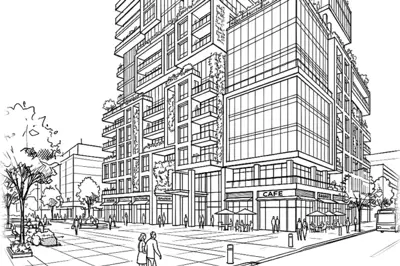
One sketch, one tower, full street life. By Robert P, Architect

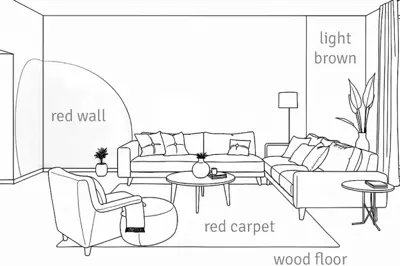
Written notes on a line drawing, turned into the room. By Lock B, Interior Designer
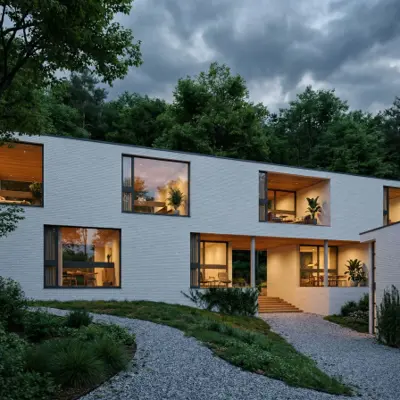
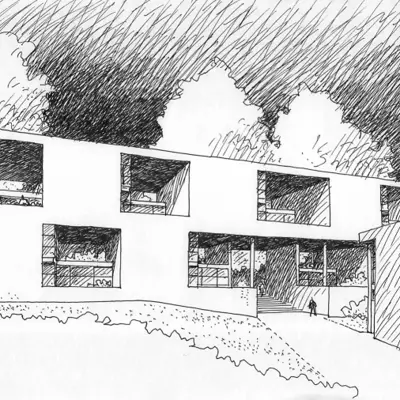
Pen on paper in the morning, sunset render by lunch. By Gaaf Design, Architect

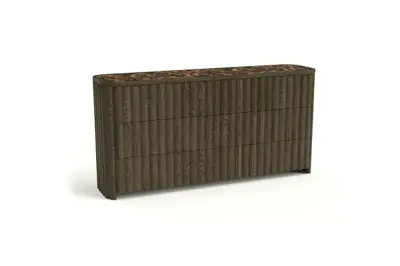
From white background to lived-in setting. By Arcelde, Furniture Designer


Same model, real materials and light. By Ahudemi, Interior Designer

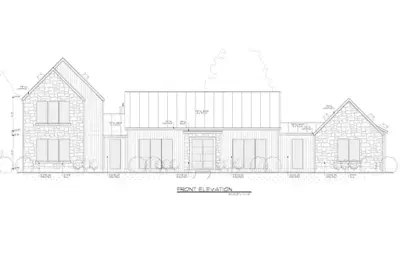
From a Revit facade to a photoreal stone house. By Airik Construction
What is mnml.ai?
mnml.ai is an AI-powered architecture rendering platform described as an “Architecture AI Design Assistant,” focused on professional visualization for architecture and interior design. It converts sketches, 3D models and ideas into photorealistic, CGI-quality renderings in seconds, for architects, interior designers and visualization artists.
mnml.ai provides an AI workspace with more than 12 specialized tools: Sketch-to-Image, Exterior and Interior AI, text-to-render (Imagine AI), masterplan and landscape tools, virtual staging, render enhancement and upscaling up to 8K, prompt and concept generation, a design assistant for targeted edits, and walkthrough animation. It also offers plugins for SketchUp, Revit, Rhino and Grasshopper, an MCP connector for AI assistants, and team workspaces for studios.
What mnml.ai does well
mnml.ai brings rendering into the modeling software: free plugins for SketchUp, Revit, Rhino and Grasshopper let you render the view you are working on, and an MCP connector lets you start renders from AI assistants such as ChatGPT or Claude. It has a wide set of specialized tools (exterior, interior, masterplan, landscape, virtual staging) and an 8K upscaler. For studios, it sells team workspaces with pooled credits and roles.
Feature breakdown: how RenderAI and mnml.ai differ
A closer look at workflows, free credits, tool breadth, video, and pipeline integration.
Inputs and workflows
RenderAI
RenderAI focuses on a simple, browser-first workflow: upload a sketch, drawing, 3D view, or photo, choose a method (e.g., Fast-Definition vs Creative-Quality) and style, and generate high-resolution renders in seconds. Creator Pro and Premium Pro add upscaling and video. This suits professionals who want fast, reliable visuals without managing a large tool suite or plugins.
mnml.ai
mnml.ai offers a broader design workspace. Architects and designers can import sketches, CAD screenshots, exports from Lumion/Enscape/V-Ray, 2D plans, masterplans, interior/exterior scenes, landscape imagery, and more, then run them through specialized tools (e.g., Exterior AI, Interior AI, Render Enhancer, Masterplan AI, Landscape AI). Its plugins for SketchUp, Revit, Rhino and Grasshopper let you render the view you are working on without leaving the modeling software.
Free credits and getting started
Onboarding is easy on both platforms:
RenderAI
Free tokens generate renders without imposed watermarks, with commercial use, so you can test on portfolios, client decks and social content. Upscale and video start on Creator Pro.
mnml.ai
Gives 100 free credits at signup with no credit card and makes several tools available immediately, including free utilities like Prompt Generator and AI Concept Generator for architecture and interior concept statements.
The practical difference: renders from RenderAI’s free plan already carry commercial use. mnml.ai lists a commercial license on paid plans and states it does not train AI models on your content.
Tool breadth and advanced capabilities
RenderAI
RenderAI deliberately keeps its feature set focused: sketch/photo/model-to-image, upscaling and image-to-video, backed by presets and rendering modes that keep the screen simple. This works well if you want a single place to go for “turn my sketch into a client-ready render or motion clip.”
mnml.ai
mnml.ai is intentionally tool-dense: Studio editor; Exterior AI and Interior AI; Render Enhancer and an 8K upscaler; Style Transfer, Sketch to Image, and text-to-render (Imagine AI); Masterplan AI and Landscape AI; Virtual Staging AI; Prompt Generator and AI Concept Generator; Design Assistant for targeted edits; and walkthrough animations up to 1080p, with several clip lengths. This breadth suits advanced visualization work, though it means more tools to learn if your main need is sketch → render → video.
Video and animation
RenderAI
On Creator Pro and Premium Pro, video is part of the same screen as image rendering: Animate turns a sketch or image into a clip of 5 to 30 seconds, up to 1080p. This helps architects, interior designers and marketers add motion to presentations and social media without leaving the tool.
mnml.ai
mnml.ai’s walkthrough animation turns designs into animations up to 1080p, with several clip lengths, inside its Studio workspace. Combined with its other tools, it fits visualization pipelines that need animation as one of many specialized outputs.
Integration into existing visualization pipelines
RenderAI
RenderAI is a standalone browser tool: it works with inputs exported from any CAD or 3D software (screenshots, images of models, etc.) and needs no plugin, so it works with every version of your software. Inside the app, Project Boards provide an infinite canvas to curate renders, compare options and present projects to clients. An MCP connector for AI assistants is in development for Premium Pro.
mnml.ai
mnml.ai brings rendering into the modeling software with free plugins for SketchUp, Revit, Rhino and Grasshopper, and its MCP connector lets you start renders from AI assistants such as ChatGPT or Claude. It also enhances outputs from engines like Lumion, Enscape and V-Ray, with upscaling up to 8K. For studios that model all day in those tools, rendering without leaving them saves export steps.
Pricing overview
List prices in USD as of October 2026. Prices change, so check each pricing page before you buy.
RenderAI
RenderAI plans
USD list prices · no imposed watermarks · commercial rights on all plans
- Free : 10 free tokens on signup for renders, with commercial use and no imposed watermark. Upscale and video start on Creator Pro.
- Starter Pack : from $13/mo (40 tokens/mo) for steady sketch-to-render volume.
- Creator Pro : from $39/mo (200 tokens/mo) with 4K/6K upscaling and AI video. The most popular plan with pros.
- Premium Pro : from $199/mo (1250 tokens/mo) for high-volume studios and teams.
Annual billing and checkout promos may lower the effective monthly price.
mnml.ai
As listed on mnml.ai’s pricing page, October 2026.
- Free: 100 credits at signup, no credit card.
- Paid plans: Lite $29/mo, Plus $49/mo and Studio $119/mo, with a commercial license.
- Teams: team workspaces with pooled credits and roles for studios.
Both start with a free option. RenderAI’s paid plans start at $13 a month, and its free renders already include commercial use and no imposed watermark. mnml.ai’s plans are built around its plugins, tool set and team workspaces. Pick the one that matches where you work: inside your modeling software, or in a browser from any image.
Who should choose RenderAI vs mnml.ai?
RenderAI is a better fit if you…
- Want the fastest path from sketch, drawing, model, or photo to client-ready renders, without installing plugins or managing 3D pipelines.
- Care about commercial-ready outputs without imposed watermarks from the first day, using free tokens to test renders on real projects and presentations.
- Prefer simple, guided controls and curated presets over complex, multi-tool workflows, while still needing professional-grade quality.
- Work in mixed teams and want a tool everyone can adopt quickly, including Project Boards to organize and present renders in-app on an infinite canvas.
- Start from sketches, photos or views from any software, on any device, including a tablet.
- Work in Spanish.
- Want one simple screen instead of a dozen tools.
mnml.ai might make more sense if you…
- Want to render from inside SketchUp, Revit or Rhino with a plugin.
- Need a team workspace with pooled credits for a whole studio.
Switching from mnml.ai in three steps
- Use the same input: an exported view, a screenshot, a sketch or a photo. No plugin needed.
- Upload it to RenderAI, pick a Style and generate. Add a short instruction if you want a specific change.
- Compare the results side by side, then upscale or animate the one you keep, and arrange the options on a Board for the client.
FAQ: RenderAI vs mnml.ai
Free credits, plugins, tool breadth, commercial use, and experience level.
- Yes, if you want a simple browser tool that works from any image: sketches, photos or views exported from any software, on any device. If you want to render from inside SketchUp, Revit or Rhino with a plugin, mnml.ai offers that.
- Yes. RenderAI's free plan gives tokens for renders, with commercial use and no imposed watermark. mnml.ai gives 100 free credits at signup, with no credit card required.
- RenderAI works from any exported image or screenshot, so it needs no plugin and works with every version of your software. An MCP connector for AI assistants is in development for Premium Pro.
- mnml.ai provides a multi-tool suite (Studio, Exterior/Interior AI, Render Enhancer, Style Transfer, Sketch-to-Image, Text-to-Render, Masterplan AI, Landscape AI, Virtual Staging, 8K Upscaler, Prompt Generator, Concept Generator, Design Assistant and Walkthrough Animation) plus plugins for SketchUp, Revit, Rhino and Grasshopper. RenderAI focuses on a few things done well: fast sketch/photo/model-to-image, upscaling and image-to-video in one simple browser screen.
- RenderAI is designed to be approachable without 3D software experience: you upload sketches, drawings, models or photos and use simple settings to get results, with the model choices handled for you. mnml.ai is built around many specialized tools and plugins for modeling software, which suits users who already work in those pipelines.
- Yes. RenderAI does not stamp a brand watermark on downloads; you can add your own when a project needs it. Generated content can be used for both personal and commercial projects. All plans include rights to use images and videos in client work, portfolios, and marketing.
- mnml.ai lists a commercial license on its paid plans and states that it does not train AI models on your content. Check its terms for the conditions that apply to free credits.
- Yes. Upload any render from mnml.ai or another tool to RenderAI to change the light or the season, upscale it, animate it or present it on a Board.
Ready for renders without imposed watermarks?
Turn sketches, drawings, models, or photos into high-resolution renders in the browser, with commercial rights from day one. Paid plans add upscaling and video.
Try Render AI for free
Free tokens · No imposed watermarks · No credit card required