AI rendering plugin for Rhino
Turn your Rhino view into a photoreal render, right inside Rhino
Capture the view you're working on, pick a style and get the render next to your model in 1 to 60 seconds. Made for product designers and architects in the early stages of a design, on any computer that runs Rhino.
20 extra tokens when you connect the plugin
 on Trustpilot
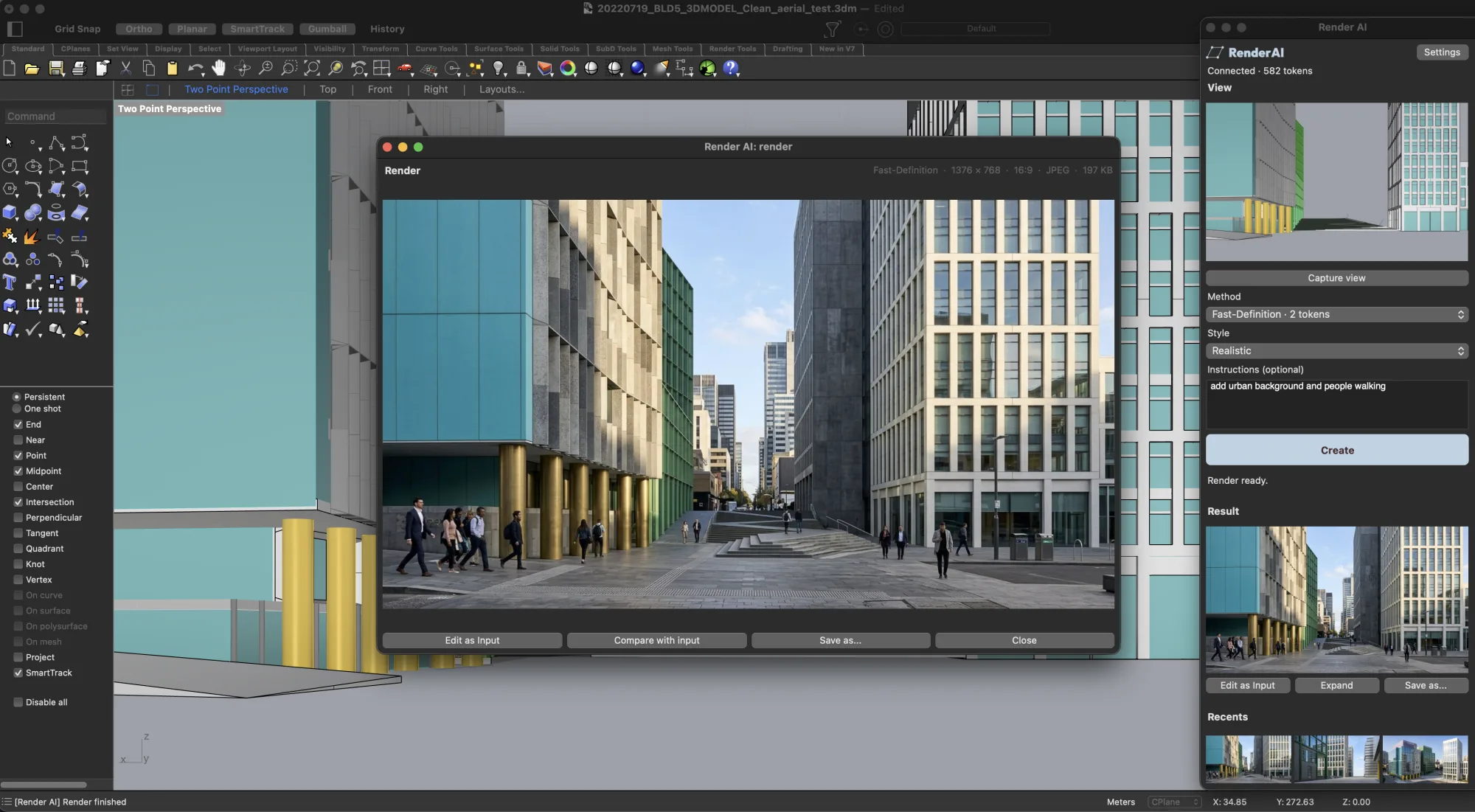
Made for exploring early ideas or creating final images in seconds
While the design is still changing, test a form or a material on the model you have today. When it's ready, use the same panel to create final images for clients and presentations. Each render takes 1 to 60 seconds. Renders run on our servers, so you don't need an expensive CPU or GPU.
Your next render is one click from your model
Skip the export
Click Capture view and the panel uses exactly what you see. No screenshots to crop or files to upload.
See it before you spend
Check the capture and the token cost of each method first. You always know what you're about to render.
Keep modeling while it renders
The render uses the view you captured, so Rhino stays free. Orbit, edit and try the next idea while you wait.
Test more options
Compare each render with your view. Edit as Input turns a result into the next starting image.
Your model stays with you
Your .3dm file stays on your computer. The plugin sends only the captured image and your instructions.
One RenderAI account
Your tokens and your plan work the same in Rhino and on the web.
From viewport to render in four steps
- 01
Open the panel. Type RenderAI in Rhino. The panel docks next to your viewports.
- 02
Capture your view. Frame it and click Capture view. Grid and axes stay out, and the proportions match your viewport.
- 03
Choose a method and a style. Add instructions if you want, such as "warm evening light".
- 04
Click Create. The render appears in the panel, ready to compare, refine or save.
See what it does with a real model


3D model to aerial building rendering by Trung N.
Rhino versions
| Mac | Windows | |
|---|---|---|
| Rhino 7 | Available | Soon |
| Rhino 8 | Soon | Soon |
| Rhino 9 | Soon | Soon |
On a version marked soon? Get early access and we'll tell you as soon as it's ready. Early users help shape the plugin.
Get started
- 01
Register and install. Create your free RenderAI account, then download and install the Rhino file.
- 02
Let us know. We'll send you your personal key.
- 03
Add your key. Type RenderAI, paste the key and get 20 extra tokens for free.
Using another version?
Start in your browser
Export your view or take a screenshot, then upload it to RenderAI. It works with any Rhino version, on any computer. In the web app you can also upscale, animate and organize your renders in Boards, depending on your plan.
Try it freeSupports designs from any CAD and 3D model
Keep your current workflow. Any image from your model is a starting point.
Upload a screenshot or JPG/PNG export from any software, or explore our plugins


Render AI is used to post-produce, upscale, and animate renders from real-time rendering software


We are an independent platform not affiliated with SketchUp, Graphisoft, Autodesk, Vectorworks, Rhinoceros, Enscape, D5 Render, Twinmotion, or their subsidiaries. All trademarks belong to their respective owners. Rhinoceros is a registered trademark of Robert McNeel & Associates.
Frequently Asked Questions
- Rhino 7 for Mac works today. Rhino 7 for Windows, Rhino 8 and Rhino 9 are coming soon. With any version, you can also export a view and use the web app.
- During the beta, the plugin is open to every plan, including free, and you get 20 extra tokens when you connect it. Renders use the same tokens as the web app: 1, 2 or 4 depending on the method. After the beta, the plugin will be part of Creator Pro and Premium Pro.
- No. The plugin sends only the image you captured and any instructions you write. Your .3dm file stays on your computer.
- No. Renders run on our servers and usually take 1 to 60 seconds, on any computer that runs Rhino. You only need an internet connection.
- Yes. All plans include commercial use, with no imposed watermarks.
- Yes. Save the render from the panel and upload it to the web app. Upscale and video are on Creator Pro and Premium Pro.
- Failed renders return their tokens to your account.
- Install the plugin and ask for your personal key. During the beta, we send it to you and you paste it in the panel. Keep it private, since it can spend your tokens. Steps on the Help page.
- Yes. SketchUp, Revit and Fusion are coming. See all plugins.
- No. RenderAI is an independent product and is not affiliated with Robert McNeel & Associates.