Prompt to Parametric: Claude AI, CAD & Architecture
Summarize with AI
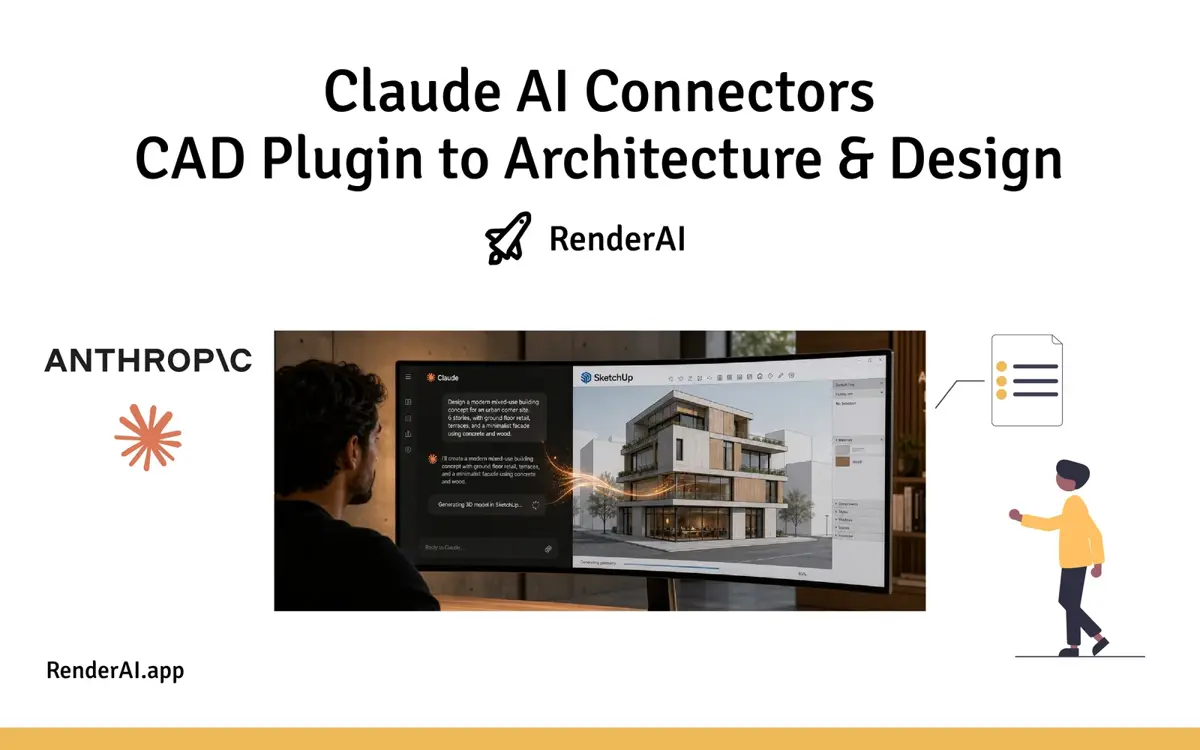
On April 28, 2026, Anthropic launched a set of Claude connectors that plug directly into creative tools like Adobe, Blender, Autodesk Fusion and SketchUp. For architects and interior designers, this is the first time a mainstream AI assistant can generate and manipulate real 3D models inside the tools you already use—not as marketing renders, but as editable geometry.
We’re still very early: the tools are rough, reliability is uneven, and they won’t replace your modeling skills any time soon. But they clearly point toward a future where you describe intent and AI agents handle more of the low-level clicking, scripting and repetitive modeling—while tools like Render AI handle the jump to rich visual storytelling.
- What Actually Launched on April 28, 2026
- SketchUp Connector: From Conversation to .skp
- Autodesk Fusion Connector: Parametric CAD by Conversation
- BIM Experiments: Revit, Archicad and MCP
- How This Changes Architectural Workflows
- Limitations and Why This Is Still Early
- Where RenderAI Fits in This New Stack
- How to Start Experimenting This Week
- Massing by Prompt, Rendered by AI: The Full Stack Is Here
- References
What Actually Launched on April 28, 2026
Anthropic’s “Claude for Creative Work” release introduced nine official connectors that embed Claude inside a set of creative applications: Adobe Creative Cloud, Blender, Autodesk Fusion, SketchUp, Affinity by Canva, Ableton, Splice, and Resolume Arena/Wire. These are not random community scripts—Anthropic partnered directly with vendors like Autodesk, Adobe, Blender Foundation and Trimble (SketchUp) to ship and maintain these integrations.
Under the hood, all of these connectors use the Model Context Protocol (MCP), the same open specification Claude uses for other tools, which lets the model call “tools” that read and modify project state. In practice, that means Claude can inspect your scene, call specific operations (for example, run a Python function in Blender or a modeling command in Fusion), and iterate in a loop until it has built or modified what you asked for.

How the stack connects: design tools expose their APIs through MCP, and Claude acts as the AI engine that reads, reasons, and writes back to each one.
SketchUp Connector: From Conversation to .skp
Trimble documents the “SketchUp Connector for Claude” as a way to generate SketchUp files directly from a Claude chat. With version 1 of the connector, Claude can:
- Build 3D models using basic shapes and curved surfaces.
- Organize geometry into groups and components rather than a single soup of edges and faces.
- Export proper
.skpfiles compatible with current and older SketchUp versions.
The connector exposes tools like get_docs (load the SDK), evaluate_py (run Python code against the live model) and save_model (write the finished SketchUp file), which Claude chains together while it incrementally builds the model. For architects and interior designers, this is a new kind of “massing by prompt”: you can describe a room, lobby, or piece of furniture in words and receive a starting model you can immediately refine in SketchUp.
If you’re already using SketchUp as part of your rendering pipeline, see our guide on SketchUp AI Rendering for Architects and Designers for how that output feeds into photorealistic results.

Claude and SketchUp in a feedback loop: each instruction updates the model, and Claude reads the result before deciding the next step.
Autodesk Fusion Connector: Parametric CAD by Conversation
The Autodesk Fusion connector goes a step deeper into parametric CAD. Anthropic explains that Fusion subscribers can now create and modify 3D models simply by conversing with Claude, treating natural language as a front-end to sketches, features and constraints. Community tutorials and early videos show Claude creating simple parts—like cubes with filleted edges—purely from chat, with the model updating live in Fusion.
The connector is implemented as an MCP server that accepts text instructions and translates them into operations like sketching profiles, extruding solids, applying fillets and assembling components. For architecture and interiors, the immediate impact is more on custom components, furniture, joinery and fabrication-ready parts than whole buildings—but it previews how parametric object libraries might be generated and iterated via agents rather than manual modeling.

"Reduce the overall height to 36''" — the AI updates the stair parametrically in Fusion without touching a single constraint manually.
BIM Experiments: Revit, Archicad and MCP
While Revit and Archicad do not yet have official Anthropic connectors, the AEC community has been experimenting aggressively with MCP servers that connect these BIM tools to Claude. Recent walkthroughs show Claude driving Revit via MCP to create rooms and walls, color-code elements by properties, and fix modeling errors using natural language instructions, with the AI agent planning and executing sequences of Revit operations.

Claude driving Revit via MCP: the AI agent reads model state and executes operations directly inside the BIM environment.
Similarly, community MCP servers for Archicad expose BIM models to Claude so it can query and manipulate project data through Python scripts running inside Archicad. Together with the official SketchUp and Fusion connectors, these experiments suggest a near-future stack where concept massing, BIM, CAD and visualization can all be orchestrated by AI agents rather than brittle point-to-point scripts.
For a real-world example of BIM connecting to AI visualization, see how Vantem cut visualization time using Revit, D5 and RenderAI.
How This Changes Architectural Workflows
Connectors compress the gap between “talking about design” and “having something in the model” by allowing you to describe intent instead of executing every command yourself. Rather than opening a blank SketchUp file and drawing every edge, you could ask Claude to generate a starting scheme—say, a 2-level co-working space with specific spans, head heights and program blocks—and then move straight into refinement.
On the CAD side, Fusion’s connector hints at a future where detailing a custom handrail, bracket or kitchen system becomes a conversational loop: you negotiate dimensions, constraints and options with Claude while it handles the tedious modeling steps. Add community BIM MCPs to the mix and you get a continuous agent layer that can read and modify your Revit/Archicad model, generate options, fix certain classes of errors, and export views or schedules on demand.
This mirrors how AI is already changing the earlier stages of design. In our post on AI rendering for early architectural ideation, we explored how fast iteration from rough sketch to visualized concept changes the way architects present options to clients—connectors push that speed even further upstream.
Limitations and Why This Is Still Early
For all the hype, today’s connectors are clearly a v1 and come with serious limitations. SketchUp’s connector currently focuses on generating new models rather than deeply editing existing, highly detailed projects, and it works best on relatively simple geometry. Fusion’s connector can misinterpret ambiguous instructions, generate low-quality topology, and struggle to maintain clean constraints as designs become more complex.
From a design-quality perspective, early demos frequently show odd proportions, awkward adjacencies and spatial arrangements that ignore basic circulation logic or human scale, especially in multi-room layouts. BIM MCP prototypes also highlight fragility: agents sometimes place or modify elements in ways that technically “work” for the software but feel wrong architecturally, requiring careful human review and cleanup of both geometry and spatial relationships.
The bottom line: treat connectors as a sketch tool that accelerates rough massing and component generation, not as a production modeling assistant you can hand work to unsupervised.
Where RenderAI Fits in This New Stack
Connectors solve a different problem than RenderAI, but in a way that makes visual rendering tools more central, not less. Claude plus SketchUp or Fusion compress the path from narrative to geometry; RenderAI compresses the path from geometry and intent to communicable imagery.
In a connector-driven workflow, a plausible loop looks like this: you sketch scenarios with Claude and SketchUp, generate quick study models, then push those directly or via exports into RenderAI to explore materials, lighting, moods and presentation-ready views without labour-heavy manual rendering. As community MCPs for BIM mature, agents could even automate the generation of view sets, camera positions and exports, feeding RenderAI a stream of candidate scenes that you curate and refine into final presentation packages.
For a deeper look at how AI rendering tools stack up for architecture practices, see our roundup of AI rendering tools for architects and designers.

The connector in action: Claude on the left, SketchUp on the right — one conversation, one model, no manual export.
How to Start Experimenting This Week
If you want to explore this wave without betting your practice on it, there are a few low-risk experiments to try:
- Install and sandbox the SketchUp connector. Trimble’s documentation shows how to connect Claude and SketchUp through the Connectors directory; start by generating simple room or furniture models from text prompts, then inspect and clean the geometry yourself.
- Test Fusion on non-critical components. Follow early guides on setting up the Autodesk Fusion connector and use it for small parametric parts or study pieces, not structural cores.
- Watch BIM MCP demos before touching live projects. Revit and Archicad MCP walkthroughs are great for understanding what’s possible and what breaks—use them to inform your own guardrails.
- Close the loop with RenderAI. Once you have Claude-generated geometry, treat it as input to your existing RenderAI workflows: test how “AI-native” massing models behave when you push them through your rendering pipeline, and adjust your prompts and templates accordingly. Try it on Render AI.
The point is to start learning how these tools behave now, while the stakes are low. By the time connectors are reliable enough to handle real project work, you’ll already know which parts of your workflow they fit into—and which they don’t.
Massing by Prompt, Rendered by AI: The Full Stack Is Here
Claude’s new connectors for SketchUp, Autodesk Fusion and other creative applications mark a quiet but meaningful shift: AI is moving from outside the design tools—commenting on exports and screenshots—into the heart of modeling environments. The current experience is uneven, sometimes frustrating, and absolutely not “production-ready automation” for most firms, but it already shows how describing intent in natural language can shortcut some of the most repetitive parts of early design and component modeling.
For practices that care about speed from idea to client-ready visuals, the interesting frontier is not “AI vs. architect,” but how tools like Claude connectors, BIM MCP servers and AI rendering tools can be composed into workflows where humans focus on design decisions and AI handles more of the clicks, scripts and pixels in between.
References
- Anthropic — “Claude for Creative Work” (official announcement)
- SketchUp Help — SketchUp Connector for Claude (official docs)
- Claude Help Center — Connectors
- Build This Now — Claude for Creative Work Connectors (MCP deep dive)
- OpenTools.ai — Anthropic Wires Claude Into 9 Creative Apps
- YouTube — Claude now connects to Autodesk Fusion
- YouTube — How to Install Revit MCP with Claude Code
- YouTube — Revit + Claude MCP for Beginners
- YouTube — Intro to Claude for BIM
- From BIM to AI: Vantem’s Revit–D5–RenderAI Workflow
- SketchUp AI Rendering for Architects and Designers
- AI Rendering for Early Architectural Ideation
- This content combines research with RenderAI expert analysis and editing
Tags:
About the Author:
This article was written by Fran.