AI Rendering Concepts Explained: Complete Guide
This guide has been expanded with new sections on Rendering, Sketch-to-Image, Sketch-to-Render, Camera Control, Atmospheric Rendering, and Image-to-Video to better cover the full AI rendering workflow.
In this guide we explain the key concepts behind Generative AI and AI Rendering. Whether you are an architect, interior designer, product designer, or just getting started, understanding these terms will help you get better results. If you have questions about a specific topic, you can get in touch with us and we will try to help!
This post was updated on March 18, 2026 to include new concepts relevants to AI Rendering in 2026.
Core AI Concepts
Prediction
Every time you run a model on a powered with AI app, you’re creating a prediction. A prediction is an object that represents a single result from running the model, from an input to an output. As an input it could include the prompt you provided, an image, or the settings. The output is the text, image, sound, or other kind of result but also other metadata like the model version, the user who created it, and timestamps.
Whenever you run a model, you’re creating a prediction. AI predictions could take a few milliseconds or minutes, even hours, depending on the model and server.
Temperature or Guidance Scale
The temperature, or guidance scale (sometimes referred as cfg - classifier free guidance) is a parameter that controls how much the image generation process follows the text prompt. The higher the value, the more image sticks to a given text input but also the less diversity and quality you will get.
Dataset
A machine learning dataset is a collection of data that is used to train the model. A dataset acts as an example to teach the machine learning algorithm how to make predictions. The common types of data includes text data or image data.
AI Biases
Machine learning bias, also known as algorithm bias or AI bias, is a phenomenon that occurs when an algorithm produces results that are systemically prejudiced due to erroneous assumptions in the machine learning (ML) process. Deep learning modules tend to reproduce or exacerbate biases that are already present in the training dataset.
Rendering & AI Rendering
Rendering / Render
Rendering (also called Render in Latin American countries or Renderizado in Spain) is the process of generating a final image or visual output from a scene, model, or description. In traditional workflows, rendering refers to the computational process of producing a photorealistic or stylized image from a 3D model — a step that architects, interior designers, and product designers use to present their concepts before construction or production.
The term differs slightly by region: in the United States and most English-speaking markets, the full word Rendering is standard. In Latin America and Spain, the shortened form Render and Renderizado is far more common and is used both as a noun (“un render”) and as a verb (“renderizar”). Both refer to the same output: a visual representation of a design or concept.
Today, the word render is also used more broadly to describe any AI-generated image based on a design input — whether from a sketch, a text prompt, or an existing photo.
AI Rendering / AI Render
AI Rendering (or AI Render) is the process of generating high-quality images or visualizations using artificial intelligence models instead of — or in combination with — traditional 3D rendering engines. Rather than requiring complex 3D scenes, materials, and lighting setups, AI rendering can produce photorealistic or stylized visuals from a simple sketch, a photograph, or a text description.
AI rendering dramatically reduces the time and technical skill required to produce professional-quality images. Render AI is built specifically around this workflow: upload a sketch or draw directly online, choose a style, and the AI generates a render in seconds. You can explore how different rendering methods compare to find the right approach for your project.
Render Artificial Intelligence
The phrase render artificial intelligence is commonly used to refer to practical AI rendering workflows, including (1) generating a render using AI, (2) converting a sketch into a realistic render with AI, or (3) enhancing an existing rendering by improving lighting, materials, and atmosphere. In practice, it is not a distinct technical category; it describes outcomes produced by generative image models and guided rendering pipelines.
For architecture or interiors, the most reliable approach is typically image-guided: start from a sketch, line drawing, or 3D screenshot to preserve composition, then let the model synthesize materials, lighting, reflections, and mood. Text-only generation offers more creative range but less predictability, which is why sketch-to-render and ControlNet-style guidance are widely used in production workflows.
In most scenarios, the primary requirement is control: consistent geometry, camera perspective, and design intent, with AI handling realism and styling. Tools like Render AI are designed around this division of labor: the input provides structure, and the model generates rendering quality in minutes instead of hours.
Photorealistic Rendering
Photorealistic rendering refers to images that are indistinguishable — or nearly indistinguishable — from real photographs. AI models trained on millions of images can now produce photorealistic results from sketches and text prompts that would have previously required hours of 3D modeling and rendering. The quality depends on the model, the input image, and the prompt. For architectural and interior design work, photorealistic rendering is the most common output goal and is one of the primary use cases for AI rendering tools.
Sketch-to-Image / Sketch-to-Render
Sketch-to-Image (also called Sketch-to-Render) is the process of transforming a hand-drawn sketch, a 3D model screenshot, or a rough drawing into a photorealistic or stylized image using AI. This is one of the most powerful applications of generative AI for designers and architects because it bridges the gap between early-stage ideation and polished visual communication.
The process typically works by using the sketch as a structural guide — the AI preserves the composition, proportions, and spatial layout while applying realistic textures, materials, lighting, and atmosphere on top. Tools like ControlNet and T2I-Adapter are specifically designed to enable this kind of guided generation.
You can explore the full sketch-to-render process using Midjourney AI, or see how ChatGPT handles sketch-to-image generation for a direct comparison.
Text-to-Image
Text-to-Image is an AI generation mode where you describe what you want in words and the model produces an image from that description alone — no sketch or reference image required. The model interprets the text prompt and generates an image that matches the described scene, style, mood, and composition.
While Sketch-to-Image gives you more spatial control, Text-to-Image offers more creative freedom and is ideal when you want to explore concepts without a defined starting point. Most major AI platforms — including DALL-E 3, Midjourney, and Stable Diffusion — support text-to-image as their primary mode. Render AI also supports text-to-image as an input method alongside sketch upload and online drawing.
Model Architecture & Training
Diffusion Models
Diffusion models are a class of generative models that learn to create images by gradually removing noise from random data. They work by adding noise to training images and then learning to reverse this process. Popular examples include Midjourney, Stable Diffusion, DALL-E, and Krea, which have revolutionized AI image generation. If you want to understand how to work with one of these models hands-on, see our guide on how to run Stable Diffusion.
Latent Space
Latent space is a compressed representation of data where similar concepts are positioned close together. In image generation, models work in this compressed space rather than directly with pixels, making the process more efficient and allowing for smoother interpolations between different concepts.
VAE (Variational Autoencoder)
A VAE is a component that compresses images into latent representations and reconstructs them back to pixel space. In Stable Diffusion, the VAE handles the conversion between the latent space where generation happens and the final image output.
U-Net
U-Net is the core neural network architecture used in diffusion models for image generation. It predicts the noise to be removed at each step of the denoising process, gradually transforming random noise into coherent images based on text prompts.
Fine-tuning
Fine-tuning involves training a pre-trained model on specific data to adapt it for particular styles, subjects, or use cases. This process allows customization of AI models for specialized applications without training from scratch.
LoRA (Low-Rank Adaptation)
LoRA is an efficient fine-tuning technique that modifies only a small subset of model parameters, allowing for quick adaptation to new styles or concepts while maintaining the original model’s capabilities. LoRA models are lightweight and can be easily shared and combined.
Control & Guidance Systems
Adapters
Adapters are added to AI pre-trained text-to-image models. They let us input visual information to guide large text-to-image models during the generation process. Some examples are ControlNet or T2I-Adapter.
ControlNet
ControlNet is a powerful adapter that enables precise control over image generation using various input conditions like edge maps, depth maps, pose estimation, or sketches. It allows users to maintain structural consistency while generating images, making it invaluable for architectural visualization and design work.
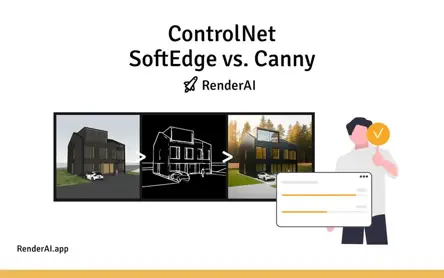
Two of the most common ControlNet models for design workflows are SoftEdge and Canny. If you are unsure which to use, read our dedicated guide on ControlNet SoftEdge vs Canny to understand the differences and when to apply each. You can also learn more about the full range of ControlNet models for Stable Diffusion.
T2I-Adapter
T2I-Adapter provides an alternative to ControlNet for guiding image generation with visual inputs. It offers similar functionality but with different implementation approaches, often requiring less computational resources while maintaining good control over the generation process. Read our in-depth look at T2I-Adapter as an alternative to ControlNet to see when it performs best.
CFG Scale
Classifier Free Guidance (CFG) Scale determines how closely the AI follows your text prompt. Lower values (1–7) create more creative, diverse images but may stray from the prompt. Higher values (8–20) stick closely to the prompt but may reduce image quality and creativity.
Generation Parameters
Seeds
A seed is a number that determines the initial random state for image generation. Using the same seed with identical settings will produce the same image, allowing for reproducible results and systematic experimentation with different parameters.
Sampling Methods
Sampling methods (like DPM++, Euler, DDIM) determine how the AI removes noise during image generation. Different samplers can affect image quality, generation speed, and the final aesthetic, with some being better suited for specific types of content.
Noise Scheduling
Noise scheduling controls how noise is added and removed during the diffusion process. Different schedules can affect the quality and characteristics of generated images, with some schedules being optimized for faster generation or better quality.
Prompt Engineering
Prompt engineering is the art and science of crafting effective text prompts to guide AI image generation. It involves understanding how different words, phrases, and structures influence the output, including the use of negative prompts to avoid unwanted elements. For renderings specifically, being direct and specific works best — describing the space, lighting, style, and atmosphere in concrete terms will produce significantly better results than vague descriptions.
Camera Control & Focal Length
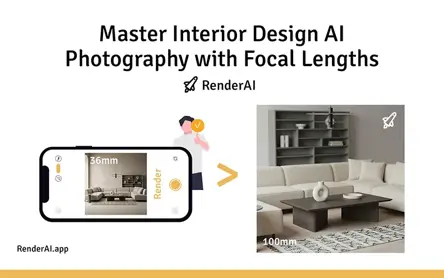
Camera control in AI rendering refers to the ability to influence perspective, field of view, and spatial depth through prompts or model settings. Focal length is one of the most impactful parameters: a wide-angle focal length (e.g., 16mm or 24mm) exaggerates depth and is great for showing expansive interiors or dramatic exteriors, while a longer focal length (e.g., 85mm or 135mm) compresses the scene and is better suited for product-style shots or detail-focused views.
Understanding how to specify camera parameters in your prompts allows you to control the narrative of each image. Read our deep dive on mastering focal lengths for AI rendering to learn how this translates to real architectural and design outputs.
Advanced Techniques
Inpainting
Inpainting allows you to modify specific parts of an existing image by masking areas and generating new content to fill them. This technique is useful for editing, removing objects, or adding elements to existing images while maintaining visual coherence.
Outpainting
Outpainting extends images beyond their original boundaries, generating new content that seamlessly continues the existing image. This technique is valuable for expanding compositions or creating panoramic views from smaller images.
Upscaling
AI upscaling enhances image resolution and quality using machine learning algorithms. Modern upscaling techniques can increase image size while adding realistic details, making them essential for preparing AI-generated images for high-resolution applications.
Multimodal AI
Multimodal AI combines multiple input types (text, images, sketches, audio) to create more sophisticated and controllable generation processes. This approach enables more intuitive interaction with AI systems and better creative control.
Real-time Generation
Real-time generation refers to AI systems that can produce images almost instantaneously as you type or draw. This capability enables interactive creative workflows and immediate feedback, revolutionizing how designers and artists work with AI tools. Platforms like Krea pioneered this mode. See how real-time image generation with Krea and RenderAI compares in a practical design workflow.
Atmospheric Rendering
Atmospheric rendering refers to applying specific moods, lighting conditions, and environmental effects to an AI-generated image. This includes time-of-day transformations (golden hour, midday, dusk, night), seasonal changes (snow, autumn foliage), and weather conditions (overcast, rain, fog). Rather than changing the structure of a space, atmospheric rendering changes how it feels — the same architectural render can evoke luxury with warm afternoon light or drama with a moonlit night scene.
This technique is particularly powerful for client presentations, where showing multiple moods from a single render helps communicate the full potential of a design. Learn how Style Enhance and Ambient Effects in Render AI make this process fast and accessible.
Image-to-Video
Image-to-Video is an AI technique that takes a static image as input and generates a short video clip with realistic motion — camera movements, lighting changes, material animation, or environmental effects like wind or water. For architects and designers, this means a single AI render can become a cinematic walkthrough or atmospheric animation without any 3D modeling or traditional animation software.
The quality and length of the generated video depends on the underlying model. Current tools can produce 5–10 second clips with impressive coherence and realism. See our guide on video AI models for architects, designers, and marketers for a practical overview of the best available tools and workflows.
References:
AI Image Generation Platforms:
Technical Documentation & Tools:
Research & Learning:
- AI
- Concepts
- Predictions
- Temperature
- Biases
- Adapters
- DataSet
- ControlNet
- Stable Diffusion
- MidJourney
- ChatGPT
- OpenAI
- Krea
- Sketch To Image
- Text To Image
- Real Time
- Models
- Diffusion
- LoRA
- VAE
- Sampling
- Scribble
- Doddle
- Sketch
- Softedge
- Canny
- Rendering
- AI Rendering
- Sketch To Render
- Photorealistic Rendering
- Camera Control
- Focal Length
- Atmospheric Rendering
- Image To Video
- Generative AI
- Workflows
About the Author:
This article was written by Francisco. Architect, Visual Designer & Founder of RenderAI.